
Oh, I’m not going to let this place die off and go dormant. Hello again. 😉
Sometimes you’re going to want to create a control with a nonlinear taper. This can be handy for controlling the frequencies of an LFO, for adjusting the smoothness of a granular sampler, and lots of other applications where you want to taper off to very fine values without cursing at your mouse and getting wrist strain.
Here, I’ve created a macro that scales the output of a knob that goes from zero to one, and connected the output to a numeric display. I’ve duplicated the macro a few times so you see how it handles values:

And what is the magical mechanism that produces this effect? It’s a simple multiplier module:

So the output is merely the input multiplied by itself, or squared. Don’t go all math phobic on me now. This is easy stuff. You’re looking at Y = X² which is a formula that creates a parabolic curve:

That’s what it looks like in an XY scope. Here’s the guts of the XY scope displaying the pretty curve:

Fire up Reaktor and build the scope mechanism yourself. It’s pretty straightforward. Make sure the settings on the XY module are as follows:
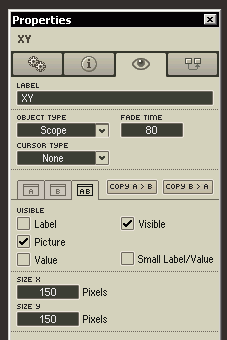
Object type should be “scope”, you don’t want any cursor, and the fade time should be 80 or thereabouts. Set the XY control to “always active” on the gears tab. So what happens if you multiply the value by itself three times instead of twice – cubing it? Try it and see what happens to the curve.