Changes include:
- Added copy / paste slice (fixed since beta)
- Added duplex OSC mappings for TouchOSC
- Added two page OSC iPad template
- Fixed release envelopes cutting off prematurely
You may download it here. Update is free for owners of Loupe 1.0 - same license info will unlock Loupe 1.5. Don't have a license? It's $15 USD and can be purchased here:
Loupe

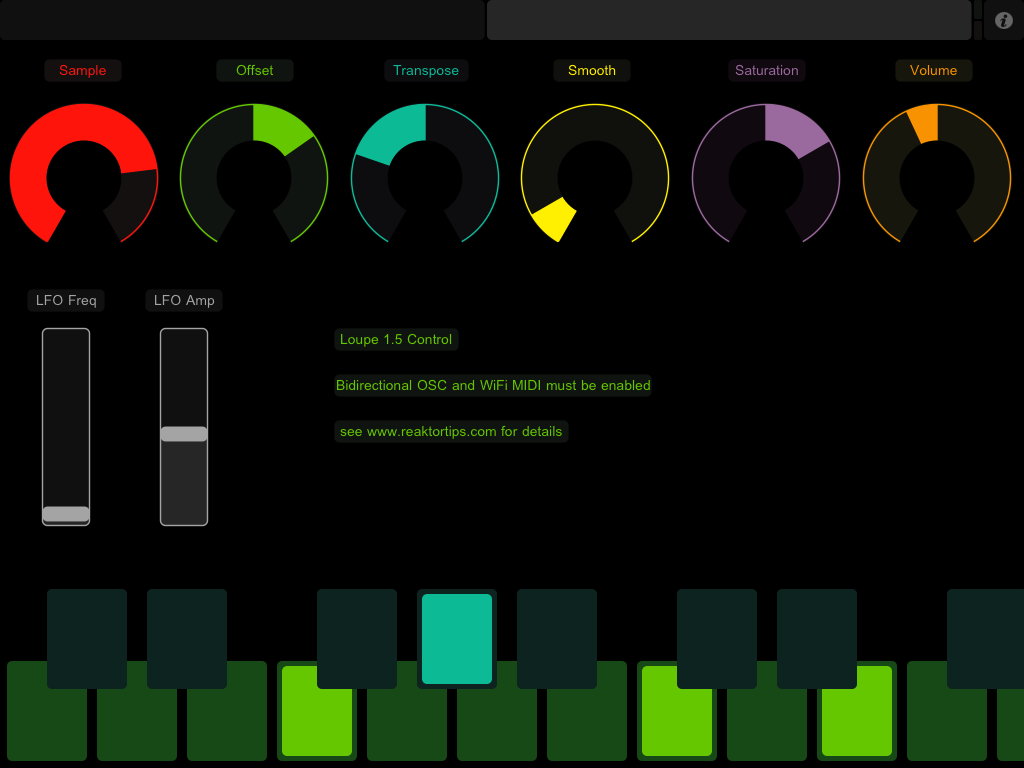
Here's a better look at the TouchOSC layout.
Above is the slice page. Each of the sliders gets updated from Reaktor when you trigger a new slice. This lets you see the loop area, filter settings, envelope settings, etc. of each slice and adjust them. Copy and paste buttons let you copy slice parameters to a different key - handy if you want the same thing on a different key except for panning, or reverse playback.
There's no way to get the sample waveform to display in TouchOSC, but the large green XY pad works the same way as the Reaktor Loupe GUI - X position sets loop position, Y sets loop length. I actually prefer working with my ears this way instead of looking at the display - it's a more hardware-y approach.
Above is the global page. This selects the sample, global position offset, position LFO and other global variables. You can use this as a performance view once the individual slices and keys are adjusted to your liking.
In order to get this fully working with Reaktor, it's necessary to set up bi-direcitonal OSC addresses. Reaktor has to talk to TouchOSC. Here's how to set that up in Reaktor:
The identifier "ipad" is necessary - that's what all the OSC send terminals in the instrument are mapped to. Take note of the ports and addresses. Reaktor's receive address should be TouchOSC's send address and vice versa. Here's what it looks like on the TouchOSC side:
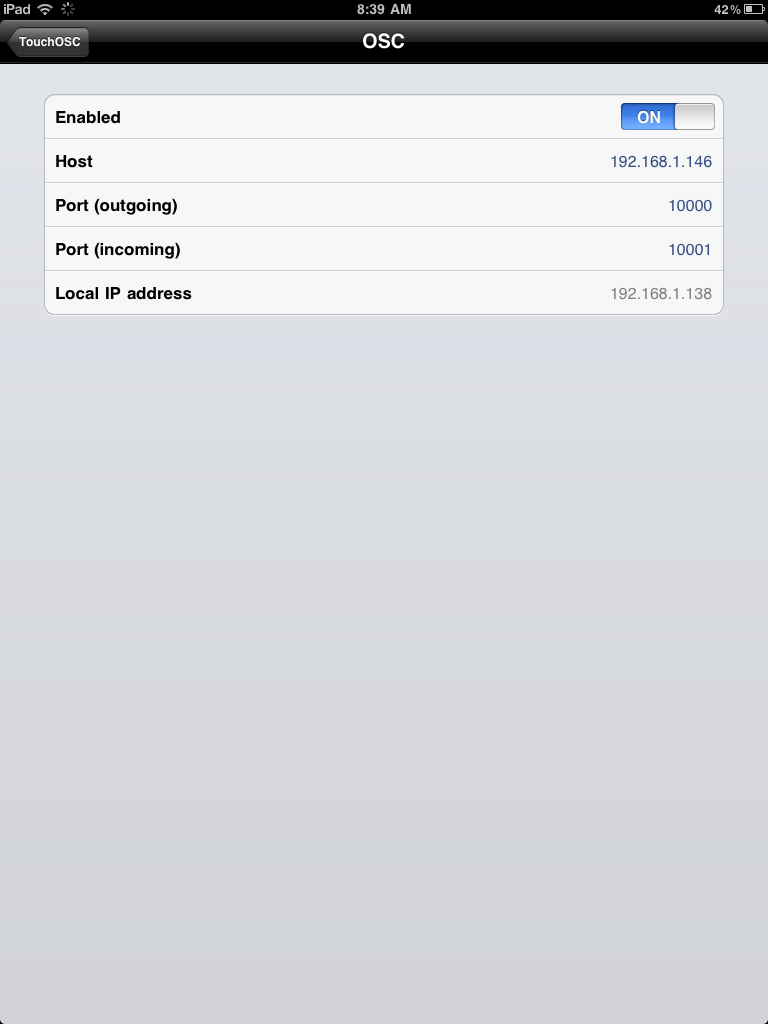
That will get the OSC connection going both ways. But wait, there's more! You also need to set up a WiFi MIDI session between your iPad and computer. Here's what that looks like on my Mac:
Selecting your iPad and hitting "Connect" should be enough to enable the session, as long as you have CoreMIDI enabled in TouchOSC. Windows users can use rtpMIDI.
Whew! This may seem like a slog at first glance, but it becomes clearer when you sit down and set up the connections, and the result is worth it. It's magical in a dark room late at night, just you and your headphones and the controls and samples. Let me know what you think, how it's working for you and any suggestions for a better layout.
If this is your first look at Loupe, you might also be interested in the other two instruments in my sampler pack, Mirage and Frame 2.
Update: here is a download of the TouchOSC template on its own, if you don't have Loupe and just want to check out the mappings and naming conventions I used. I didn't know at first that leaving a TouchOSC control's OSC address pattern as "auto" named it according to /pagename/controlname. Quite handy for homing in on the address you want when you're trying to select from a long dropdown menu in Reaktor.
May 15th minor update: Loupe version 1.5.1 uploaded - fixes OSC address patterns for copy and paste buttons.


Hi Peter,
ReplyDeleteWill the touch OSC work with reaktor as a VST in Maschine or only with reaktor in stand alone?
Unfortunately the plugin version of Reaktor doesn't support OSC. There's no excuse for that and it drives me nuts. Please go bug them in the feature request section of the forum.
ReplyDeleteI plan to do an all-MIDI version of the layout shortly, using MIDI CCs back-and-forth. I'd like to get some user feedback on the OSC version first before I invest the work though.
Thanks Peter,
ReplyDeleteI will bug them as that's just plain silly in todays market!! What kind of feedback would you like? I'd be happy to do that!
Peter,
ReplyDeleteThanks for updating Loupe! Works great with the template you made. Keep up the great work!
Glad it's working out for everyone -
ReplyDeletequasimonastic, I'm interested in whatever ideas and comments or feature suggestions you might have. Sky's the limit. I might not be able to implement everything people ask for but there's no harm in asking, and you never know...
Hi Peter,
ReplyDeleteI've had some time to play with this and it's wonderful. The one thing I'd love to see is what you've already pointed out about seeing the waveform in touch osc. I think you did an excellent job and this just adds greatly to the value of Loupe. Are you planning the same for Mirage? Oh, and the other big one is using this as a VST and I've submitted my 2 cents about that as well.
thank you so much for doing this. super fun to just have at it!
I am curious how you record what you do without the VST option. If you have time to explain
Cheers
Paul
A lot of re-engineering would have to happen on both sides for waveform display so I wouldn't hold my breath.
ReplyDeleteMirage - yeah, I think that's due for an update soon. ;-)
As for the OSC / VST issue - I tend to do my building and sound design in standalone mode, and that's where the touch surface is most useful... as a plugin, mostly you want to play the slices and record the results rather than make new slice / note settings, or at least that's what I do. It's straightforward to map some of the "global" controls like position offset and position LFO to MIDI controllers for performance in a DAW, and the note triggering is MIDI either way.
I'm still pondering a MIDI TouchOSC template. The main problem is that with MIDI the loop position needs an additional fine tune control in order to get precise placement - 127 possible positions just doesn't cut it.
None of this would be an issue if NI would simply add OSC to the Reaktor plugin!
How goes the work on sequencers?
ReplyDeleteLoupeDirect sells loupes of the highest quality. We sell dental loupes and surgical loupes at reasonable prices.
ReplyDeleteHas anyone had any luck getting this working on Windows?
ReplyDeleteOSC monitor shows incoming signals from ipad
I have a red incoming activity light (below green outgoing) in TouchOSC
RTPMidi has no option for Network Session 1 Live routing, although it's hooked-up to my pad and On in Midi prefs
I can only trigger Loupe via computer keyboard. Midi keyboard is sending messages ok.
Hi James,
ReplyDeleteYou will also need to install a MIDI loopback driver like LoopMIDI to connect the network session to Reaktor.
You don't have to call it "network session 1" - you can call it something else.
Also, have you installed Bonjour? :-)
Sorry this is such a pain for Windows users. Try asking on the TouchOSC forum. If I have a chance this weekend I'll boot up my Windows laptop and try it myself.
I did try Loopmidi before, no luck. The ipad is receiving messages from Reaktor, but Reaktor is not receiving (midi) from the ipad. OSC shows-up in the monitor however.
ReplyDeleteIf you are brave enough to boot into windows let me know what you find.
Cheers,
JD
Success! I updated OSC Editor and re-synced Loupe template, then started from scratch with RTP/LoopMidi and everything works.
ReplyDeleteYay! Glad to hear it wasn't some mysterious and intractable Windows / RTP problem.
ReplyDelete